
MongoDB Schema Analyzer
Byson is a mobile MongoDB client with built-in SSH tunneling, and its MongoDB schema analyzer runs on your phone - it samples a collection, infers BSON types on-device, and auto-redacts sensitive fields, on Android and iOS.
Short answer: a MongoDB schema analyzer samples documents from a collection and infers its real shape, since MongoDB itself is schemaless. Byson is a mobile MongoDB client with built-in SSH tunneling and a MongoDB schema analyzer for Android and iOS - it pulls a small sample, infers BSON types, counts present versus missing fields, and flags sensitive data, all locally on your phone.
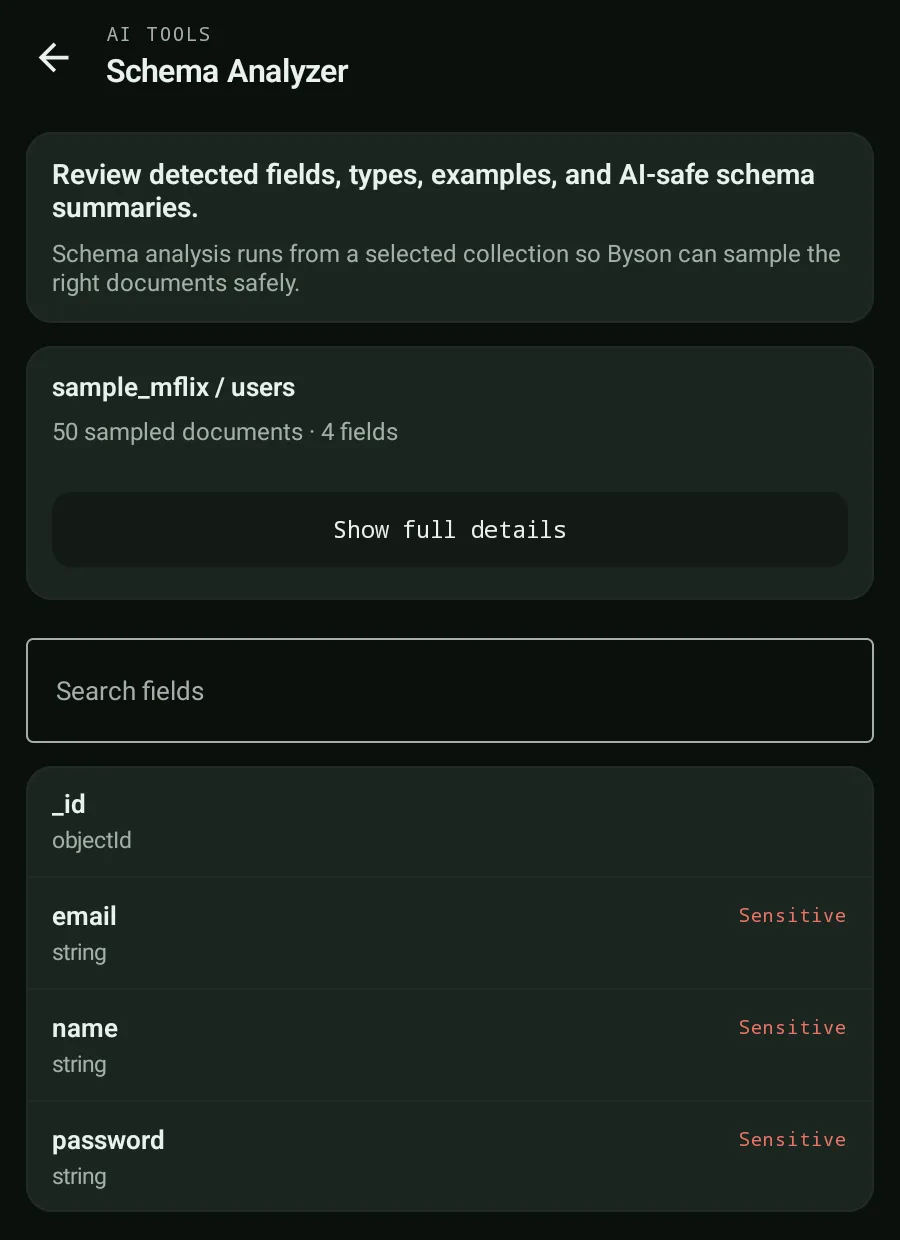
What does a MongoDB schema analyzer do?
MongoDB has no enforced schema, so two documents in the same collection can have totally different fields. A schema analyzer reverse-engineers the structure by sampling real documents. Byson samples up to about 50 documents with $sample, flattens nested paths (for example parent.child[]), and builds a field-by-field picture of your collection - so you can understand MongoDB schema analysis at a glance without writing any queries.
Does Byson upload my documents to infer the schema?
No. To infer the MongoDB schema, Byson runs the analysis locally on-device. It samples the collection with $sample and does all the type inference, counting, and example extraction in the app on your Android or iOS device - nothing is shipped to a schema-analysis server. You reach it straight from a collection's toolbar in Browse, not just from Settings.
What Byson detects
| Signal | What you get |
|---|---|
| Flattened field paths | Nested objects and arrays expanded (for example parent.child[]) |
| BSON type inference | ObjectId, Decimal128, Date, Timestamp, Binary, Regex, int, number, bool, string, array, object |
| Present vs missing counts | How many sampled documents include each field |
| Example values | Up to 3 example values per field |
| Mixed-type warning | Flags fields that hold more than one BSON type |
| Sparse-field warning | Flags fields missing in over 50% of sampled documents |
| Sensitive-field redaction | Auto-detects sensitive fields and shows [redacted] with a SENSITIVE badge |
How does Byson find sensitive fields like emails or passwords?
Privacy is built into the analyzer. To find sensitive fields in MongoDB, Byson matches field names against a library of over 30 patterns - email, password, token, ssn, address, medical, and more. It matches the full normalized path and redacts descendants, so anything under a sensitive parent is covered too:
- Redacted values display as
[redacted]with a SENSITIVE badge - the real data never renders. - The match is by name pattern on the normalized path, so nested secrets are caught.
- Because analysis is on-device, sensitive values are never sent anywhere to begin with.
Free vs Pro
Free users see the structural skeleton: each field's path, its inferred type, and the SENSITIVE badge where it applies. Byson Pro unlocks the full detail layer - present/missing counts, the up-to-3 example values per field, and the mixed-type and sparse-field warnings - so you can go from "what fields exist" to "how clean is this collection" on both Android and iOS.
Official reference: MongoDB - Data Modeling.
A MongoDB schema analyzer that fits in your pocket
Byson is a mobile MongoDB client with built-in SSH tunneling - free on Google Play and the App Store. The BYO AI Copilot is an optional bonus. On-device sampling, BSON type inference, and automatic sensitive-field redaction built in.
FAQ
What does a MongoDB schema analyzer do?
A MongoDB schema analyzer samples documents from a collection and infers its shape, since MongoDB has no fixed schema. Byson flattens nested paths, infers BSON types like ObjectId, Decimal128, Date, and Binary, counts present versus missing per field, shows example values, and warns on mixed types and sparse fields.
Does Byson upload my documents to analyze the schema?
No. Byson samples up to about 50 documents with $sample and infers the schema locally on-device. The analysis runs in the app on your Android or iOS device - it is not sent to a server, and there is no schema-analysis backend involved.
How does Byson handle sensitive fields like emails or passwords?
Byson auto-redacts sensitive fields by name pattern using over 30 patterns such as email, password, token, ssn, address, and medical. It matches the full normalized path and redacts descendants, showing values as [redacted] with a SENSITIVE badge so the actual data never appears in the schema view.
Guide: is it safe to use AI with your MongoDB data? →
Also: MongoDB AI aggregation generator →