
How to Connect to MongoDB Over an SSH Tunnel
Reach a database that lives behind a firewall or binds to localhost - straight from Android or iOS, no laptop and no exposed port.
Short answer: a MongoDB SSH tunnel from phone works by forwarding the database connection through an SSH server. Byson runs a real tunnel on-device on Android and iOS - it opens a local loopback listener and routes MongoDB traffic over the encrypted SSH channel, so the driver talks to localhost while your data stays inside the tunnel.
Disclosure: we make Byson, a mobile MongoDB client with built-in SSH tunneling. The concepts below apply to any MongoDB client, but the steps and screenshots are from Byson.
What this demo shows
The demo opens on Byson's connection form. SSH is toggled on, then an SSH host, port, and username are entered and a private key is pasted - Byson stores it encrypted in the device keychain. The MongoDB host is set to 127.0.0.1:27017, the address the SSH server sees locally. Tapping Test connection opens the tunnel, captures the server's host-key fingerprint on first use, and reports success. The connection is saved and opened - Byson reaches the database through the live SSH tunnel, with no laptop involved.
Why tunnel MongoDB over SSH at all?
Plenty of MongoDB instances are not meant to be reachable from the open internet. A common, secure setup binds mongod to 127.0.0.1 so only the host machine can reach it, or sits behind a firewall that blocks port 27017. An SSH tunnel lets you connect to that database without exposing the port: you authenticate to a server you already trust over SSH, and the SSH server forwards your MongoDB traffic from the inside.
This is the cleanest way to connect to MongoDB over SSH from Android or iPhone. Nothing new is opened to the public internet, and all the traffic between your phone and the server is encrypted by SSH.
How does the tunnel work on a phone?
Byson does not shell out to a separate SSH program - it runs the tunnel inside the app on your device:
- It opens a local loopback listener on
127.0.0.1inside the app. - That listener forwards the MongoDB connection through the SSH server (an
sshjLocalPortForwarder on Android, CitadeldirectTCPIPon iOS). - The MongoDB driver then connects to localhost, while the actual traffic rides the encrypted SSH channel out to the server and on to your database.
The result behaves exactly like the ssh -L port forward you would run on a laptop, except it is fully on-device and managed by the app.
How do I set up a MongoDB SSH tunnel from my phone?
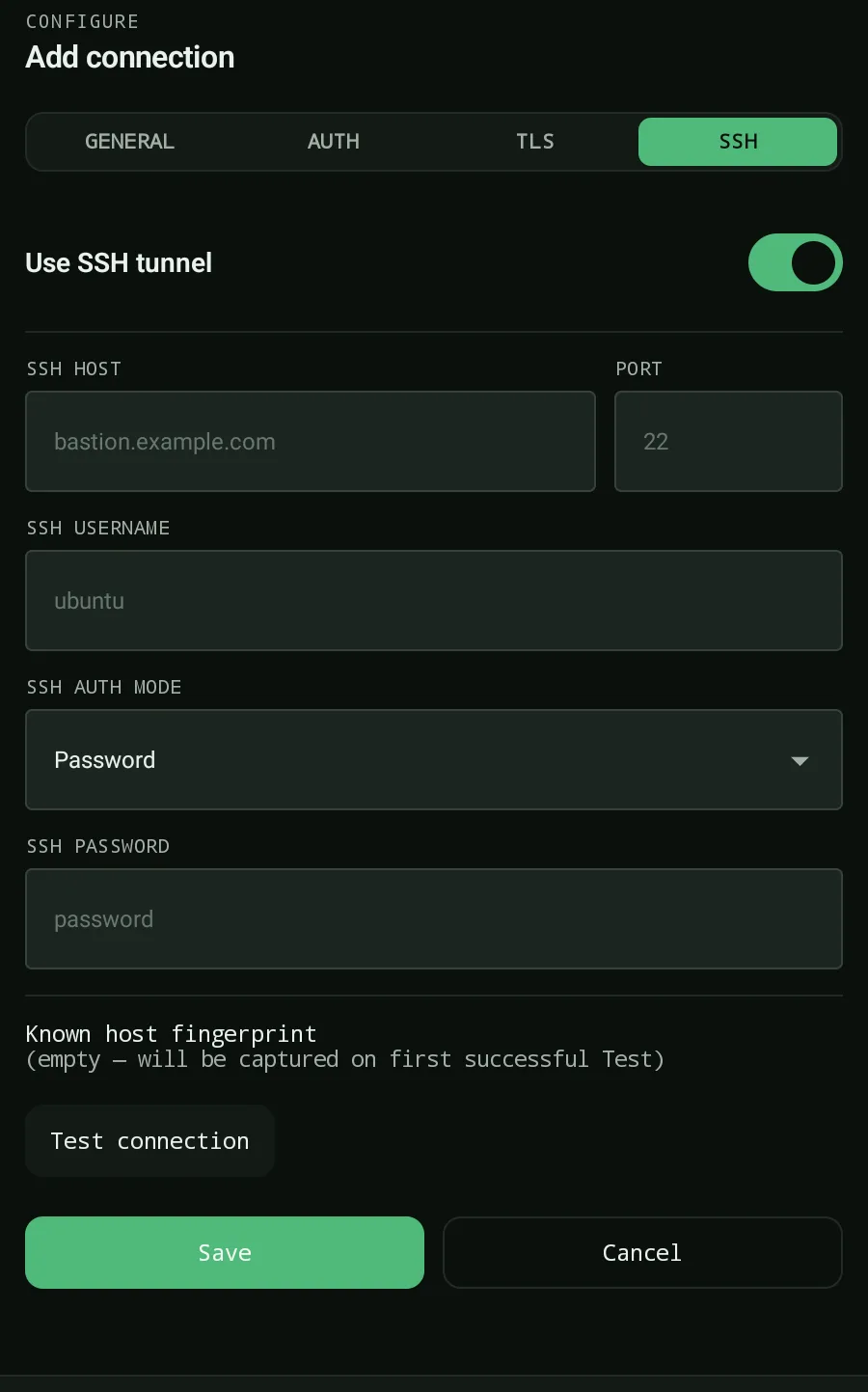
Open Byson and add a new connection, then walk through the SSH tunnel section:
- Tap + New connection and give it a name (e.g. "Prod via bastion").
- Toggle SSH tunnel on.
- Enter the SSH host and user, then choose your auth: a password or a private key.
- Set the MongoDB host as the SSH server sees it - usually
127.0.0.1:27017if Mongo runs on the same machine as the SSH server. - Tap Test. On the first connect, accept the SSH host key (trust-on-first-use).
- When the test passes, tap Save.
The key mental shift: the MongoDB host is resolved from the SSH server's point of view, not your phone's. If the server can reach Mongo at localhost:27017, that is what you type - even though your phone obviously cannot reach that address directly.
What SSH authentication and key types are supported?
Byson handles the auth methods you would expect from a desktop SSH client, including key formats that normally need ssh-keygen to convert:
| What | Supported | Notes |
|---|---|---|
| Password auth | Yes | Simplest to start with |
| Private key | RSA, ed25519 | Passphrase-protected keys supported |
| Key format | OpenSSH, PKCS#1/PKCS#8 PEM | Converted in-app - no ssh-keygen needed |
| Host key trust | TOFU | Trust-on-first-use; verified on later connects |
| TLS on top | Yes (system CA) | Combine the SSH tunnel with system-CA TLS |
Because Byson converts PKCS#1/PKCS#8 PEM keys in-app, you can paste a key exported from almost any tool and it will work without extra steps on the phone. Host keys use trust-on-first-use: the first connection records the server's key, and later connections verify against it.
Can I reach a MongoDB that only listens on localhost?
Yes - this is the headline use case. If mongod binds to 127.0.0.1 or sits behind a firewall, you do not need to open port 27017 to the world. Point the tunnel's MongoDB host at 127.0.0.1:27017 (the address the SSH server sees), and Byson forwards the connection through SSH. You get a full mobile MongoDB workflow against a database that is otherwise unreachable from the internet.
Troubleshooting the tunnel
| Symptom | Most likely cause | Fix |
|---|---|---|
| SSH connection refused | Wrong SSH host/port or SSH not running | Confirm the SSH host, port, and that the server is reachable |
| SSH auth failed | Wrong password, key, or passphrase | Recheck the user, key format, and passphrase |
| Tunnel up, Mongo times out | Wrong MongoDB host from the server's view | Use the address the SSH server sees, often 127.0.0.1:27017 |
| Host key changed alert | Server key differs from the trusted one | Verify it is the same server, then Trust new key or Reset |
That's it
A MongoDB SSH tunnel turns "this database is locked down" into "open it from my phone." Add the connection, turn the tunnel on, point Mongo at 127.0.0.1:27017 as the server sees it, accept the host key once - and you have a secure mobile MongoDB workflow without ever exposing port 27017.
Official reference: MongoDB - Connection Strings.
Tunnel into MongoDB from your phone with Byson
Free on Android and iOS. Real on-device SSH tunnel, password and private-key auth, TOFU host keys, and TLS built in.
FAQ
How do I connect to MongoDB over SSH from my phone?
Add a connection in Byson, toggle the SSH tunnel on, and enter the SSH host, user, and either a password or a private key. Set the MongoDB host as the SSH server sees it (often 127.0.0.1:27017), tap Test, accept the host key on first connect, then Save. Byson opens a real SSH tunnel on-device and forwards the MongoDB connection through it, so the driver talks to localhost while traffic rides the encrypted SSH channel.
What SSH key types does Byson support?
Byson supports password auth and private keys in RSA and ed25519, including passphrase-protected keys. Both OpenSSH and PKCS#1/PKCS#8 PEM key formats work - Byson converts them in-app, so you do not need ssh-keygen on your phone.
Can I tunnel to a MongoDB that only listens on localhost?
Yes. That is the main reason to use an SSH tunnel. Because the SSH server connects to MongoDB from its own machine, you set the MongoDB host to 127.0.0.1:27017 - the address the server sees - and reach a database bound to localhost or sitting behind a firewall without ever exposing port 27017 to the internet.
Related: MongoDB SSH mobile client · SSH host-key verification (TOFU) · connect to MongoDB Atlas from your phone