
SSH Host Key Verification (TOFU): How Byson Pins Your MongoDB Tunnel
When you tunnel MongoDB over SSH from your phone, the host key is what proves the server is the one you trust. Here's how trust on first use protects that tunnel.
Short answer: SSH host key verification using trust on first use (TOFU) means Byson captures and persists a server's host-key fingerprint the first time you connect, then verifies it on every later connect. If the key changes, Byson fails closed and asks you what to do. It works the same way on Android and iOS, guarding the SSH tunnel that carries your MongoDB connection.
Disclosure: we make Byson, a mobile MongoDB client with built-in SSH tunneling. The behavior described below is how Byson handles host keys; the underlying TOFU concept applies to any SSH client.
What this demo shows
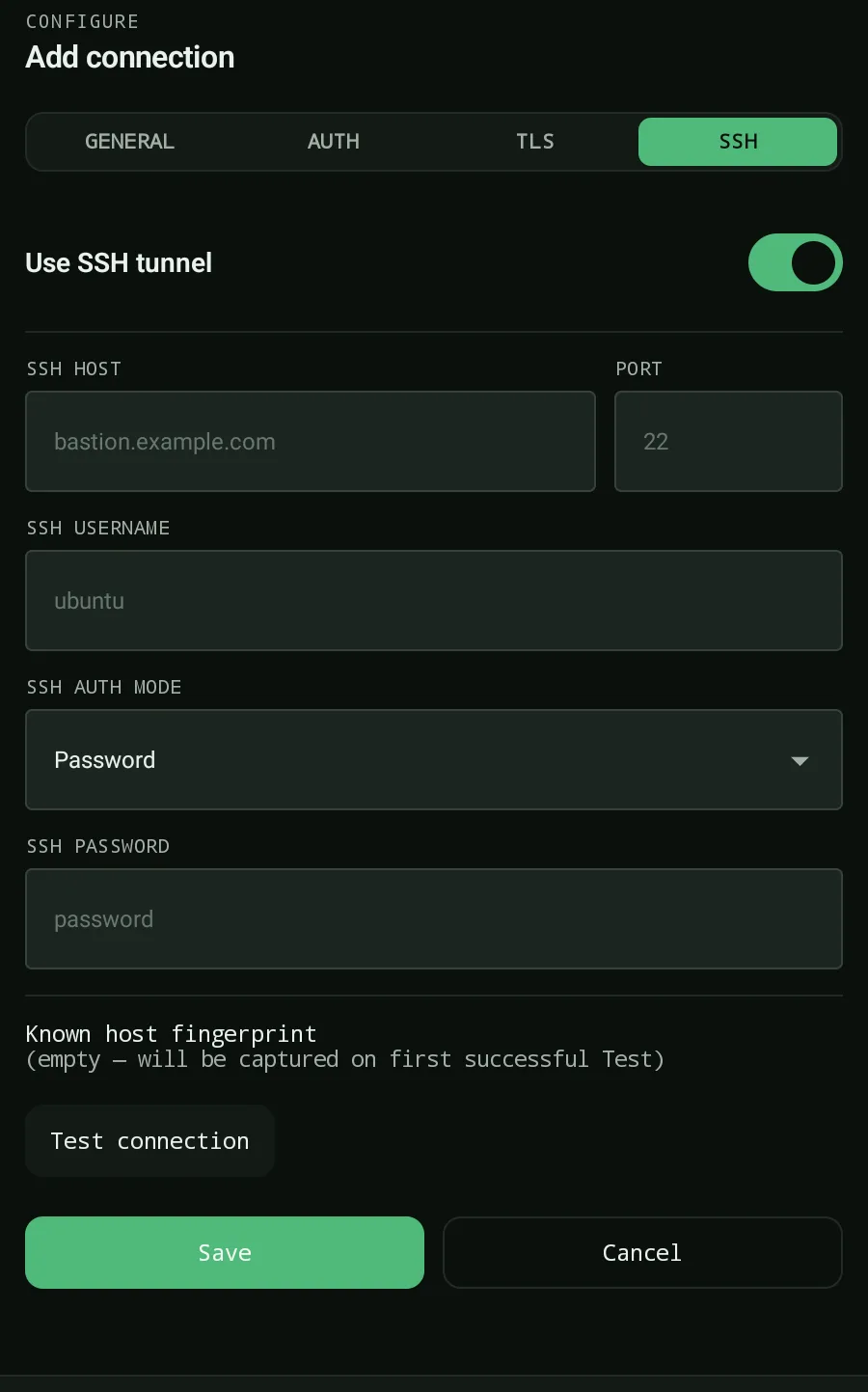
The demo opens on Byson's connection form. SSH is toggled on, an SSH host, port, and username are entered, and a private key is pasted. The form notes that the host-key fingerprint is captured on the first successful Test. Tapping Test connection opens the tunnel, records the server's host key (trust on first use), and reports success. On later connects Byson verifies the saved fingerprint and fails closed if it changes. The connection is then saved and opened over the live SSH tunnel - no laptop involved.
What is trust on first use?
SSH doesn't rely on a central certificate authority the way the web does. Instead, each server presents a unique host key. The first time a client connects, it has nothing to compare against - so it records the fingerprint it sees and assumes that's the real server. That's trust on first use (TOFU): you trust the key once, and the client watches for it to change from then on.
On a laptop this is the familiar "The authenticity of host ... can't be established" prompt that writes a line into known_hosts. Byson does the mobile equivalent automatically: on the first SSH connection it captures and persists the server's host-key fingerprint, with no file to manage by hand.
How Byson verifies the host key on every connect
Once a fingerprint is stored, every later connection is checked against it. Byson compares the key the server presents now to the one it pinned on first use. Internally this surfaces as typed outcomes - a first-trust event versus a mismatch - so the app can react correctly instead of guessing.
| Situation | What Byson does | What you see |
|---|---|---|
| First connect (no stored key) | Captures and persists the host-key fingerprint | Connects; the key is now pinned |
| Reconnect (key matches) | Verifies against the stored fingerprint and proceeds | Connects silently, as expected |
| Key changed (mismatch) | Fails closed - does not connect | "Host key changed" alert: Trust the new key, or Reset |
What happens on a MongoDB SSH fingerprint mismatch
If the presented key doesn't match the stored one, Byson does not connect. It fails closed and shows a "Host key changed" alert with two choices:
- Trust the new key - replace the pinned fingerprint with the one being presented now. Choose this only if you know why the key changed.
- Reset - clear the stored fingerprint so the next connection starts fresh from first-use trust.
Failing closed is the safe default. A changed host key can be perfectly innocent - the server was rebuilt or reinstalled, and a new key was generated. But it can also mean that someone is intercepting your connection. Byson can't tell the two apart for you, so it stops and hands you the decision instead of connecting silently to whatever is on the other end.
How this prevents an SSH man-in-the-middle attack
A man-in-the-middle (MITM) attacker sits between your phone and the real server, relaying traffic while reading or altering it. Because the attacker can't reproduce the genuine server's private host key, the key they present won't match the fingerprint Byson pinned on first use - and the connection fails closed before any MongoDB traffic flows.
This matters because the SSH tunnel is what carries your database connection. In Byson the tunnel is a local loopback listener that bridges into the remote host, so your MongoDB session rides inside SSH. Pinning the host key means that protected channel only opens to the server you actually trusted - on both Android and iOS.
The takeaway
Trust on first use turns a one-time decision into ongoing protection: pin the fingerprint once, verify it forever, and fail closed the moment it changes. That's what keeps a mobile MongoDB SSH tunnel honest - and it's why a "Host key changed" alert deserves a pause, not a reflexive tap.
Tunnel MongoDB over SSH - safely - with Byson
Free on Android and iOS. TOFU host-key pinning, fail-closed verification, and encrypted on-device storage built in.
FAQ
What is TOFU (trust-on-first-use) host-key verification?
TOFU means trust on first use. On the first SSH connection Byson captures and persists the server's host-key fingerprint. On every later connect it verifies the presented key against the stored one. There is no central certificate authority - you trust the key you saw the first time, and Byson watches for it to change.
What happens if a MongoDB SSH host key changes?
If the presented host key doesn't match the stored fingerprint, Byson fails closed and shows a "Host key changed" alert with two choices: Trust the new key, or Reset. A changed key can mean the server was rebuilt - or that someone is intercepting your connection - so Byson never connects silently until you decide.
Does Byson protect against SSH man-in-the-middle attacks?
Yes. By pinning the host-key fingerprint on first use and verifying it on every later connect, Byson protects the SSH tunnel that carries your MongoDB connection against man-in-the-middle interception. A mismatch fails closed instead of connecting, on both Android and iOS.