
MongoDB Atlas and SSH Tunnels: When You Need One
Plenty of people assume they need a tunnel to reach Atlas. Most of the time they don't. Here's when a mongodb atlas ssh tunnel actually makes sense, and what to do instead.
Short answer: Atlas itself does not sit behind SSH. You normally reach Atlas over the public internet with an IP allowlist plus the mongodb+srv connection string (or PrivateLink / VPC peering for private networking). A mongodb atlas ssh tunnel only enters the picture when you must route through a bastion or jump host that has network access to Mongo - common for self-hosted MongoDB, or for reaching Atlas from inside a locked-down VPC where only the bastion can get out. If you can't connect to Atlas, you almost always need an allowlist entry, not a tunnel.
Disclosure: we make Byson, a mobile MongoDB client with built-in SSH tunneling. The steps below describe both the Atlas allowlist case and the bastion case, but the underlying MongoDB and SSH concepts apply to any client.
Does MongoDB Atlas need an SSH tunnel?
Usually no. Atlas clusters are exposed over the public internet on their own hostnames, and access is gated two ways: the IP allowlist (which source addresses are allowed to connect) and a database user with SCRAM credentials. To connect, you add your current IP to the allowlist, grab the mongodb+srv connection string from the Atlas UI, and authenticate with your database user. There is no SSH host in that path at all.
Where the confusion creeps in: when a connection times out, it looks like a network-tunnel problem, so people reach for SSH. But the real cause is almost always that the source IP is not on the allowlist. Phones and home connections also change IP often, so an address that worked yesterday can be blocked today. The fix is an allowlist entry (or a wider rule for a known network), not a tunnel. SSH would not help here, because the Atlas endpoint is already directly reachable once your IP is allowed.
When you DO want an SSH tunnel
An SSH tunnel earns its place when something on the network forces traffic through a single trusted host. Common cases:
- Self-hosted MongoDB behind a bastion. The database runs on a private VPS or server, and the only public entry point is an SSH bastion that can reach it internally.
- A database bound to localhost on a VPS. If
mongodlistens only on127.0.0.1, nothing outside the box can connect directly. SSH into the box and forward the port. - Corporate networks. Policy may dictate that only a designated jump host can reach the cluster, so every developer connects through it.
- Auditing or forced routing. Some teams deliberately funnel all database traffic through a bastion so it can be logged and controlled in one place - including reaching a private Atlas cluster from inside a VPC.
Notice the pattern: the tunnel is about network reachability and policy, not about Atlas being special. For a plain Atlas cluster on a normal connection, you do not need any of this.
How an SSH tunnel to MongoDB works
In short, an SSH tunnel for MongoDB is a local port forward: your client opens a listener on a local port, and traffic is carried over the encrypted SSH connection to the bastion, which forwards it to the MongoDB host and port it can reach internally (often 127.0.0.1:27017). For the full step-by-step setup, see How to connect to MongoDB over an SSH tunnel.
Atlas vs self-hosted: a quick comparison
| Scenario | How you connect | SSH tunnel needed? |
|---|---|---|
| Atlas from your laptop | mongodb+srv string + IP allowlist | No |
| Atlas inside a locked VPC via bastion | Bastion + tunnel to the cluster | Sometimes |
| Self-hosted Mongo on a VPS bound to localhost | Bastion + tunnel to 127.0.0.1:27017 | Yes |
Reaching MongoDB over SSH from your phone
Byson covers both paths, so you do not have to choose your tooling based on which case you land in:
- Native Atlas support. Paste the
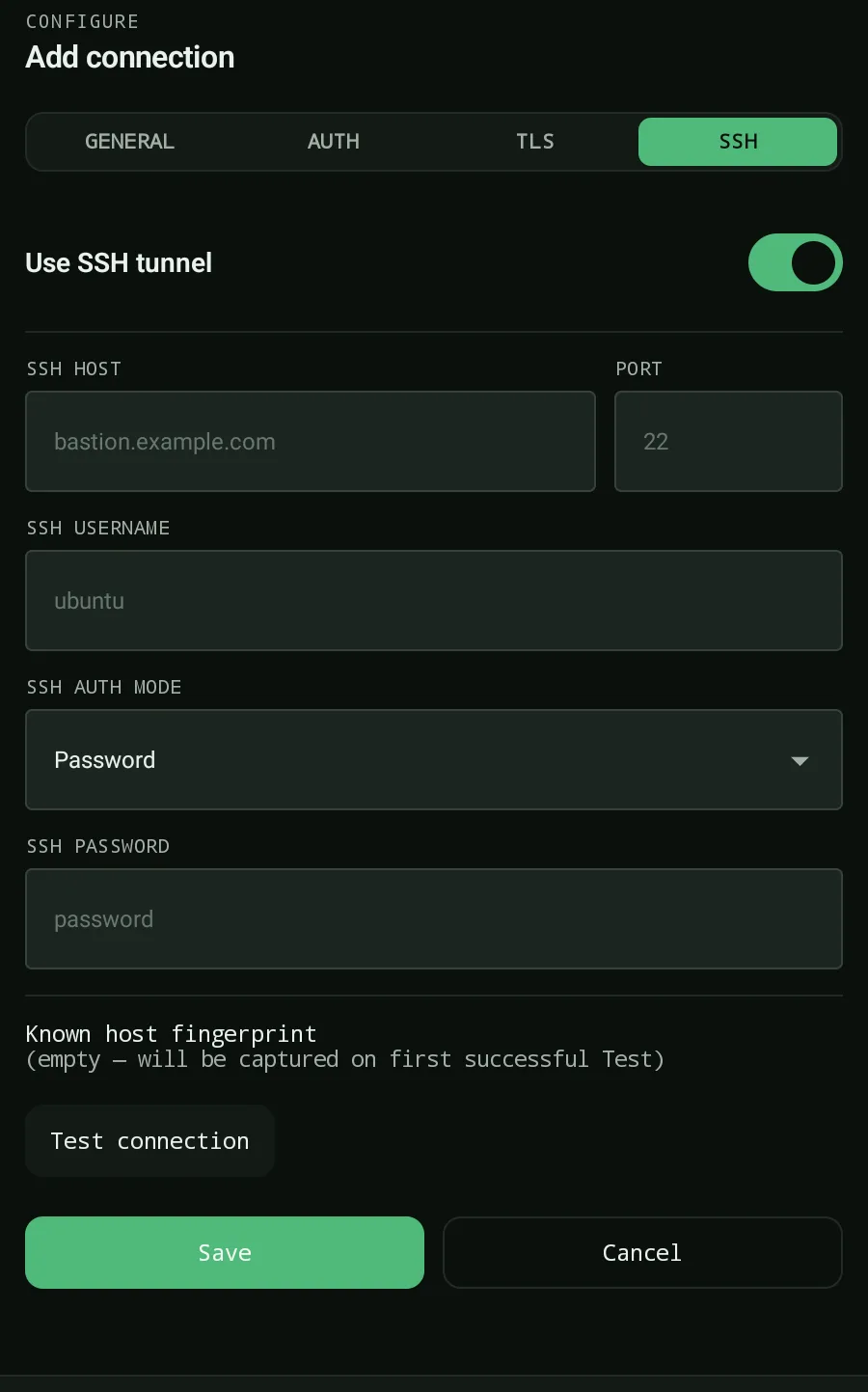
mongodb+srvseed list and Byson handles the replica set, TLS, and SCRAM auth. Add the phone's current IP to the Atlas allowlist and you are connected - no tunnel involved. - Built-in SSH tunnel. For the bastion case, fill in the SSH host, user, and credentials - password, RSA (rsa-sha2), or ed25519 keys - with TOFU host-key trust on first connect. Byson opens the local forward and points the driver at it for you.
So for a standard Atlas cluster, add the phone's IP to the allowlist. For self-hosted Mongo or a private Atlas cluster reachable only through a jump host, tunnel through the bastion. Same app, both cases handled.
Official reference: MongoDB Atlas - Configure IP Access List Entries.
Connect to Atlas or a bastion-tunneled Mongo with Byson
Byson is a mobile MongoDB client with built-in SSH tunneling - free on Google Play and the App Store. Native Atlas srv support and a one-form SSH tunnel both built in. The BYO AI Copilot is an optional bonus.
FAQ
Does MongoDB Atlas need an SSH tunnel?
Usually no. Atlas is reached over the public internet using the mongodb+srv connection string, with access controlled by the IP allowlist and a database user. You only need an SSH tunnel when network rules force you through a bastion or jump host, for example reaching Atlas from inside a locked-down VPC that only allows outbound traffic via the bastion. For a normal laptop or phone, add your IP to the allowlist instead.
How do I connect to Atlas through a bastion host?
Open an SSH connection to the bastion (with a password or private key), then set up a local port forward from a port on your device to the Atlas host and port the bastion can reach. Point your MongoDB client at the local forwarded port. The bastion must have network access to the Atlas cluster, for example via VPC peering or PrivateLink. In Byson, fill in the SSH host, user, and key, and the app manages the tunnel for you.
What host and port do I use for a MongoDB SSH tunnel?
The tunnel forwards from a local port on your device to the MongoDB host and port as seen from the bastion. For a self-hosted database bound to localhost on a VPS, that destination is often 127.0.0.1:27017 from the bastion's perspective. Your client then connects to the local forwarded port, and the SSH tunnel carries the traffic to the database.
Related: Connect to MongoDB Atlas from your phone →
Related: MongoDB over an SSH tunnel from your phone →