
How to Fix a MongoDB COLLSCAN and Suggest an Index
A slow query almost always means MongoDB is scanning your whole collection. Here's how to spot a COLLSCAN and add the right index - from your phone.
Short answer: a COLLSCAN means MongoDB read every document because no index matched your query, which is the main cause of slow queries. To fix a MongoDB COLLSCAN, run the query, open the profiler, and tap Suggest index - Byson reads the query filter and prefills the right index on Android and iOS.
Disclosure: we make Byson, a mobile MongoDB client with built-in SSH tunneling. The steps below describe how Byson detects a COLLSCAN and suggests an index, but the underlying MongoDB concepts apply to any client.
What is a COLLSCAN in MongoDB?
A COLLSCAN (collection scan) is MongoDB's way of saying it had to read every document in the collection to answer your query, because no index matched. It is the single biggest reason a query is slow: as the collection grows, a COLLSCAN reads more and more documents, and response time grows with it.
The opposite is an IXSCAN (index scan), where MongoDB walks an index and jumps straight to the matching documents. When you see a COLLSCAN in a query plan, that is the signal of a missing index.
| COLLSCAN | IXSCAN | |
|---|---|---|
| What it does | Reads every document in the collection | Walks an index to matching documents |
| Index used | None - no index matched | An index covers the query fields |
| Speed as data grows | Gets slower with every new document | Stays fast |
| What it means | Missing index - the main cause of slow queries | The query is using an index correctly |
Why is my MongoDB query slow on mobile?
On any platform, a slow MongoDB query usually comes down to the same thing: a missing index. Without a matching index, MongoDB does a collection scan and reads every document, so the query gets slower as the data grows. The trick is being able to see the plan and fix it without switching to a laptop.
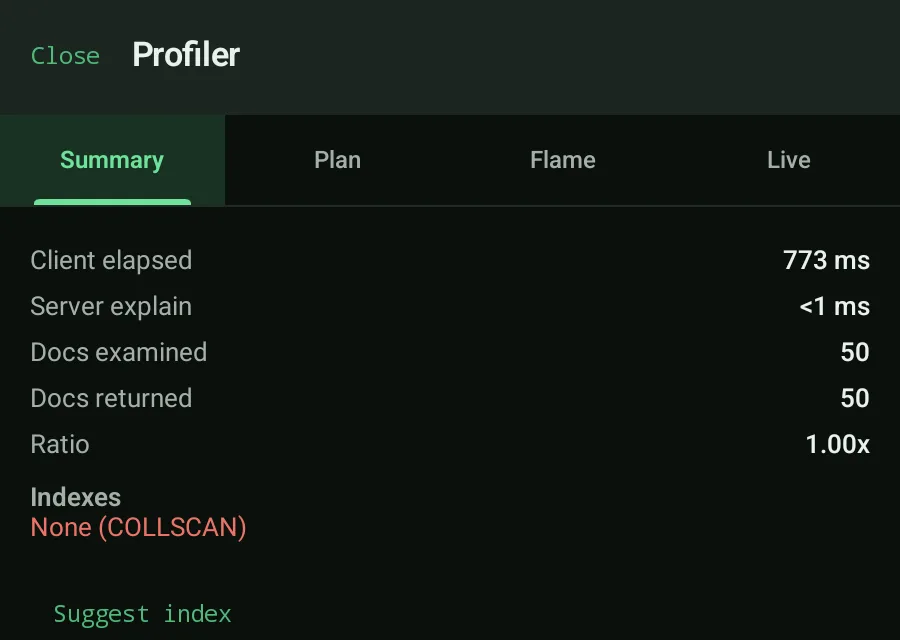
That's what the profiler is for. Run your find() query in Byson, open the profiler, and check the Plan and Flame tabs - if Byson shows a COLLSCAN, you've found the cause. (For a deeper tour of the four profiler tabs, see MongoDB query profiler on mobile.)
How does Byson suggest an index for a slow query?
When a COLLSCAN is present, Byson shows a Suggest index action. Here's what it does under the hood:
- It parses the query filter and takes the top-level fields from
$match. - It flattens
$andso the fields inside it are included. - It skips
$or, because an$orcan't be covered by a single index. - It opens the Index Create screen prefilled with the suggested keys, so you review before anything is created.
You stay in control: Byson never creates the index for you. It just removes the guesswork about which fields to put in the key.
Steps to fix a COLLSCAN and add the index
- Run the query. Execute your
find()query against the collection. - Open the profiler. Switch to the Plan or Flame tab.
- See the COLLSCAN. Byson detects and highlights the collection scan.
- Tap Suggest index. Byson parses the filter and proposes a key from your
$matchfields. - Review the prefilled index. Check the keys on the Index Create screen and adjust if needed.
- Create. Confirm to build the index on the collection.
- Re-run. Execute the same query again.
- Confirm IXSCAN. The plan switches from COLLSCAN to an index scan - the query is now using your index.
Need different index types - TTL, unique, or sparse? See create TTL, unique and sparse indexes.
That's the fix
A COLLSCAN is MongoDB telling you a query has no index to lean on, so it reads everything. Run the query, open the profiler, let Byson suggest the index, create it, and watch the plan flip to IXSCAN. It's the fastest path from "why is this slow?" to a query that scales - all from your phone.
Official reference: MongoDB - Analyze Query Performance.
Find and fix slow MongoDB queries with Byson
Byson is a mobile MongoDB client with built-in SSH tunneling - free on Google Play and the App Store. The BYO AI Copilot is an optional bonus. Profiler, COLLSCAN detection, and one-tap Suggest index built in.
FAQ
What is a COLLSCAN in MongoDB?
A COLLSCAN (collection scan) means MongoDB read every document in the collection because no index matched your query. It is the main cause of slow queries: the more documents a collection holds, the longer a COLLSCAN takes. The fix is to add an index so MongoDB can do an IXSCAN instead.
How does Byson suggest an index for a slow query?
When the profiler detects a COLLSCAN, Byson shows a Suggest index action. It parses the query filter, takes the top-level fields from $match (flattening $and, and skipping $or because those aren't covered by a single index), and opens the Index Create screen prefilled with the suggested keys so you can review and create the index.
Why is my MongoDB query slow on mobile?
A slow query usually means a missing index, so MongoDB falls back to a COLLSCAN and reads every document. Run the query in Byson, open the profiler, and check the Plan and Flame tabs: if you see a COLLSCAN, tap Suggest index, create the prefilled index, re-run, and confirm the plan switches to an IXSCAN.
Related: MongoDB query profiler on mobile →
Related: Create TTL, unique and sparse indexes →