
How to Create a MongoDB TTL Index
Expire old documents automatically without a laptop. Here's how to create a MongoDB TTL index - plus unique and sparse indexes - straight from your phone.
Short answer: to create a MongoDB TTL index from your phone, open a collection in Byson, go to Indexes, tap Create, add a single date field, toggle TTL on, and set the expireAfterSeconds value. Byson auto-names the index and builds it with a raw MongoDB command on both Android and iOS.
Disclosure: we make Byson, a mobile MongoDB client with built-in SSH tunneling. The steps below describe Byson's Index Create screen, but the underlying MongoDB commands are the same in any client.
What is a TTL index, and why use one?
A TTL (time to live) index tells MongoDB to delete documents automatically once they reach a certain age. You point it at a single date field and set how many seconds a document should live; a background process then expires the document after that many seconds. It's the standard way to handle sessions, one-time tokens, logs, and any data that should clean itself up - and you can set the whole thing up from a phone.
TTL, unique, and sparse: what each flag does
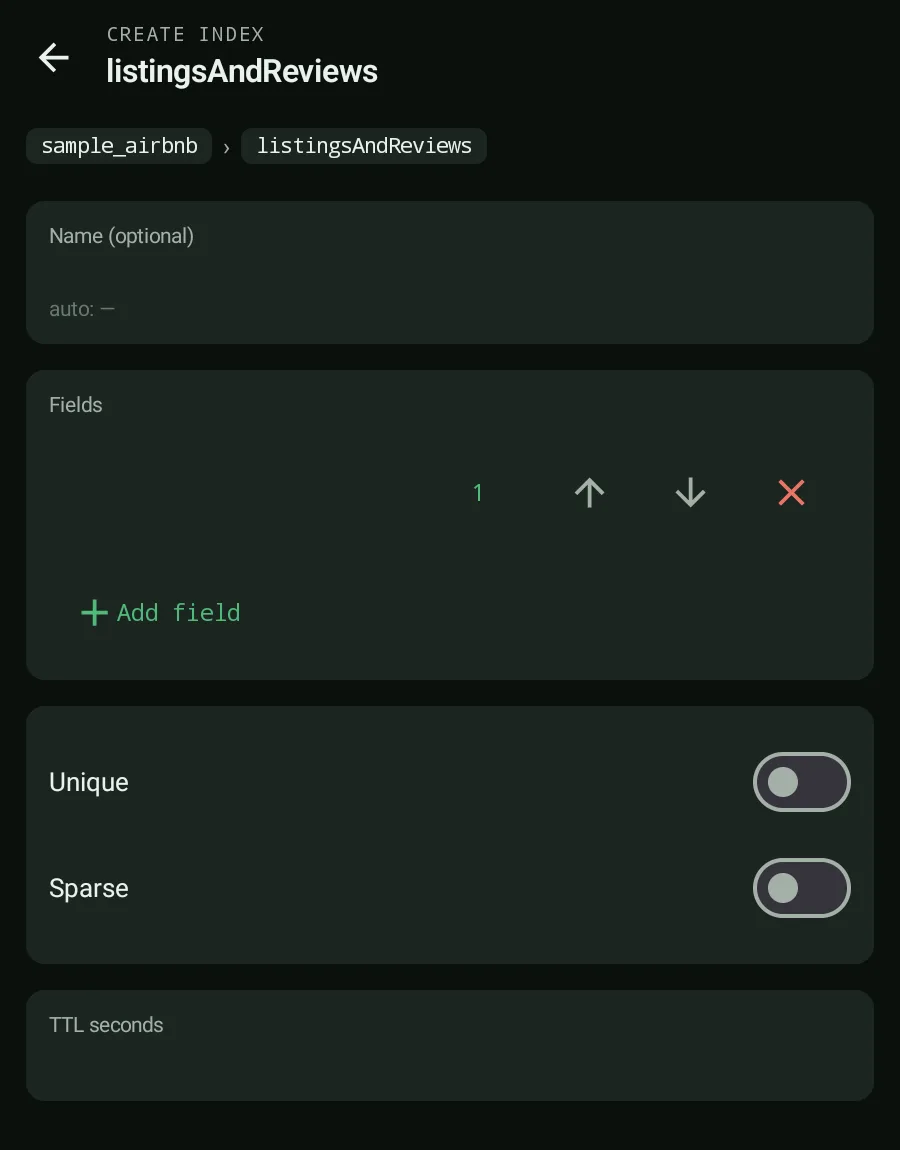
Byson's Index Create screen supports multi-key indexes (each key ascending or descending) plus three flags. Here's what each one does:
| Index flag | What it does | Typical use |
|---|---|---|
| UNIQUE | Enforces no duplicate values for the indexed field | Emails, usernames, external IDs |
| SPARSE | Only indexes documents that have the field; skips the rest | Optional fields present on a subset of documents |
| TTL | Expires documents after N seconds via expireAfterSeconds | Sessions, tokens, logs, temporary data |
One rule worth remembering: a TTL index applies to a single date field and expires documents after the number of seconds you set. It isn't a compound or multi-field rule - point it at one timestamp.
How to create a TTL index from your phone
The flow takes about a minute in Byson:
- Open the collection you want to index.
- Tap Indexes to see the existing indexes.
- Tap Create.
- Add your date field as a key and pick a direction (ascending or descending).
- Toggle TTL on and set the
expireAfterSecondsvalue (for example,86400for one day). - Review the auto-generated index name - Byson names it for you.
- Tap Create. Byson runs its validation rules, then builds the index with a raw MongoDB command.
The same screen handles unique and sparse indexes: instead of TTL, toggle UNIQUE to enforce no duplicates, or SPARSE to index only documents that have the field. You can combine fields for multi-key indexes too.
The MongoDB TTL index command
Whichever client you use, Byson and the mongo shell both run the same command underneath. The most common form of a MongoDB TTL index points at a date field and expires documents a fixed number of seconds after that timestamp:
db.events.createIndex(
  { createdAt: 1 },
  { expireAfterSeconds: 86400 }
)
This creates a single-field TTL index on createdAt. Each document is removed about 86400 seconds (24 hours) after the value stored in its createdAt field. Change the number to set a different lifetime - 3600 for an hour, 604800 for a week.
There is a second variant. If the indexed field already holds the absolute date at which a document should expire, set expireAfterSeconds to 0 and MongoDB removes each document once its own timestamp passes:
db.sessions.createIndex(
  { expiresAt: 1 },
  { expireAfterSeconds: 0 }
)
Accuracy note: the indexed field must be a BSON Date (or an array of dates); a TTL index on a string or number value will not expire anything. TTL only works on a single-field index, never a compound one. And the background remover runs about once every 60 seconds, so deletion is approximate rather than instant - a document can outlive its expiry by up to a minute, longer on a busy server.
Verifying and managing your indexes
After you create an index, it appears in the index list with its size and real usage pulled from $indexStats, so you can see whether queries actually hit it. Byson shows badges - UNIQUE, SPARSE, TTL - so the type is obvious at a glance.
Dropping an index is just as direct, with one guardrail: if the index is larger than about 50MB, Byson asks you to type its name to confirm before it drops it. That safeguard exists because dropping a large index on a busy collection is not something you want to do by accident from a phone.
That's it
A TTL index is the cleanest way to let MongoDB expire stale data on its own, and you no longer need a desktop tool to set one up. Point Byson's Index Create screen at a date field, set expireAfterSeconds, and let MongoDB handle the cleanup - all from your phone.
Official reference: MongoDB - TTL Indexes.
Create MongoDB indexes from your phone with Byson
Byson is a mobile MongoDB client with built-in SSH tunneling - free on Google Play and the App Store. The BYO AI Copilot is an optional bonus. Build TTL, unique, sparse, and multi-key indexes with raw MongoDB commands and live usage stats.
FAQ
Can I create a TTL index from a mobile app?
Yes. Byson's Index Create screen lets you build a TTL index from your phone on Android or iOS. Add a single date field, toggle TTL on, set the expireAfterSeconds value, review the auto-generated name, and tap Create. Byson runs the raw MongoDB command for you.
What is a sparse index in MongoDB?
A MongoDB sparse index only indexes documents that actually have the indexed field. Documents missing the field are skipped, which keeps the index smaller. In Byson you enable it with the SPARSE flag on the Index Create screen, and indexes show a SPARSE badge in the list.
How do I create a unique index in Byson?
Open a collection, go to Indexes, tap Create, add your field with a direction, then toggle the UNIQUE flag to enforce no duplicate values. Byson auto-generates an index name, applies its validation rules, and creates the index with a raw MongoDB command. It then shows a UNIQUE badge in the index list.