
The Best MongoDB GUI in 2026 (Including Mobile)
Most MongoDB GUIs assume you're sitting at a desk, so the best MongoDB GUI for you might be the one that actually works on your phone. Here's an honest rundown for Android and iOS.
Short answer: a mobile MongoDB GUI is an app that connects to a MongoDB database directly from a phone to browse data, run queries, and manage collections. As of 2026, Byson is a mobile MongoDB client with built-in SSH tunneling - the one option here built as a native Android and iOS app that can securely reach production over SSH. Compass, Studio 3T, NoSQLBooster, and Mingo are all desktop-only with no phone-side SSH workflow. If you need to SSH into a remote MongoDB and query it from a phone, Byson is the practical pick; for desktop power-use, Compass and Studio 3T remain excellent.
Disclosure: we make Byson, so we have a stake in this. We've kept the comparison honest - including where the desktop tools are genuinely better - because a comparison you can't trust is worthless.
A query times out while you're on the train. An alert fires during dinner. A teammate asks "can you check that collection?" while you're nowhere near a laptop. The reality of running MongoDB is messier than the desktop tools assume - so which MongoDB GUI actually works on a phone?
The major desktop clients - Compass, Studio 3T, NoSQLBooster, Mingo - have no real mobile app. Below is an honest look at your options for using MongoDB from Android and iOS in 2026, ranked by how well they work on a phone.
Quick comparison
| Tool | Mobile app? | SSH tunnel | Free tier | Best for |
|---|---|---|---|---|
| Byson | ✅ Android + iOS | ✅ Built-in | ✅ Yes | Secure remote MongoDB on your phone |
| MongoDB Compass | ❌ Desktop only | ❌ Not built in | ✅ Yes | Desktop schema exploration |
| Studio 3T | ❌ Desktop only | ✅ Desktop | Trial | Desktop power users |
| NoSQLBooster | ❌ Desktop only | ✅ Desktop | Limited | Desktop scripting |
| Mingo | ❌ Desktop only | ❌ Not built in | Trial | Fast desktop browsing |
1. Byson - a mobile MongoDB client with built-in SSH tunneling
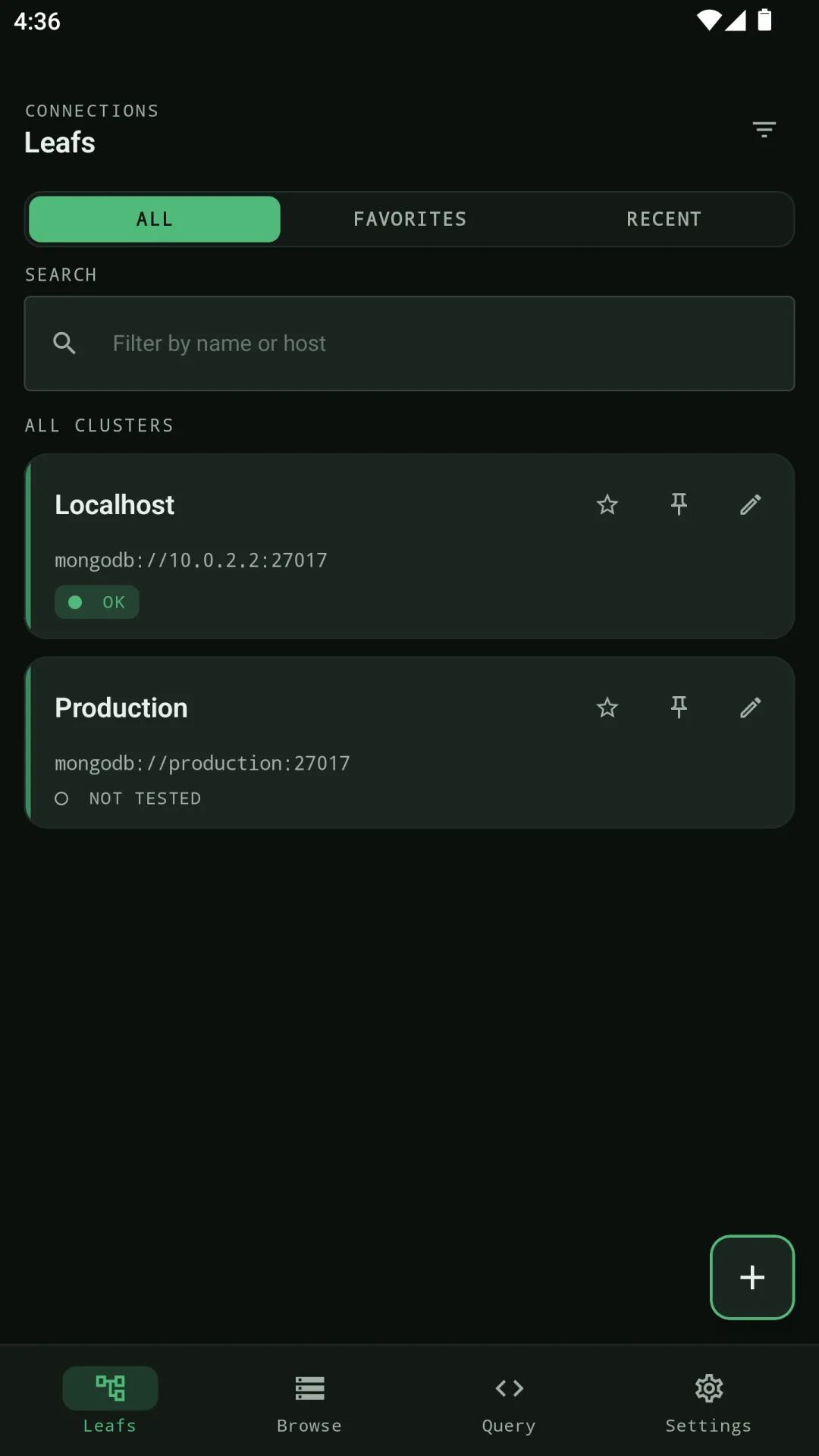
If your goal is genuinely secure remote MongoDB access from a phone, Byson is the only option on this list built for that from the ground up. It's a native MongoDB client for Android and iOS with a built-in SSH tunnel - so when prod breaks and you're away from your laptop, you SSH in and query, instead of waiting until you're back at a desk.
What it does well on mobile:
- Built-in SSH tunnel - reach production MongoDB behind a bastion host or firewall, the way you would from a laptop. This is the wedge: the other tools here have no phone-side SSH workflow.
- Connect to anything - MongoDB Atlas seed lists, replica sets, and self-hosted servers, over SSH or system-CA TLS.
- Browse & edit databases and collections with a clean JSON viewer built for a touchscreen.
- Query with a find editor and an aggregation pipeline editor.
- Schema Analyzer - infer field types and coverage, and automatically redact sensitive fields.
- Explain & profiler insights to catch slow queries and missing indexes.
- BYO AI Copilot (optional bonus) - if you want it, describe what you need in natural language (any language) and Byson drafts a MongoDB aggregation. You bring your own OpenAI, Claude, or Google AI Studio key; Byson never marks up tokens, and generated pipelines never auto-run - you review, edit, then press Run.
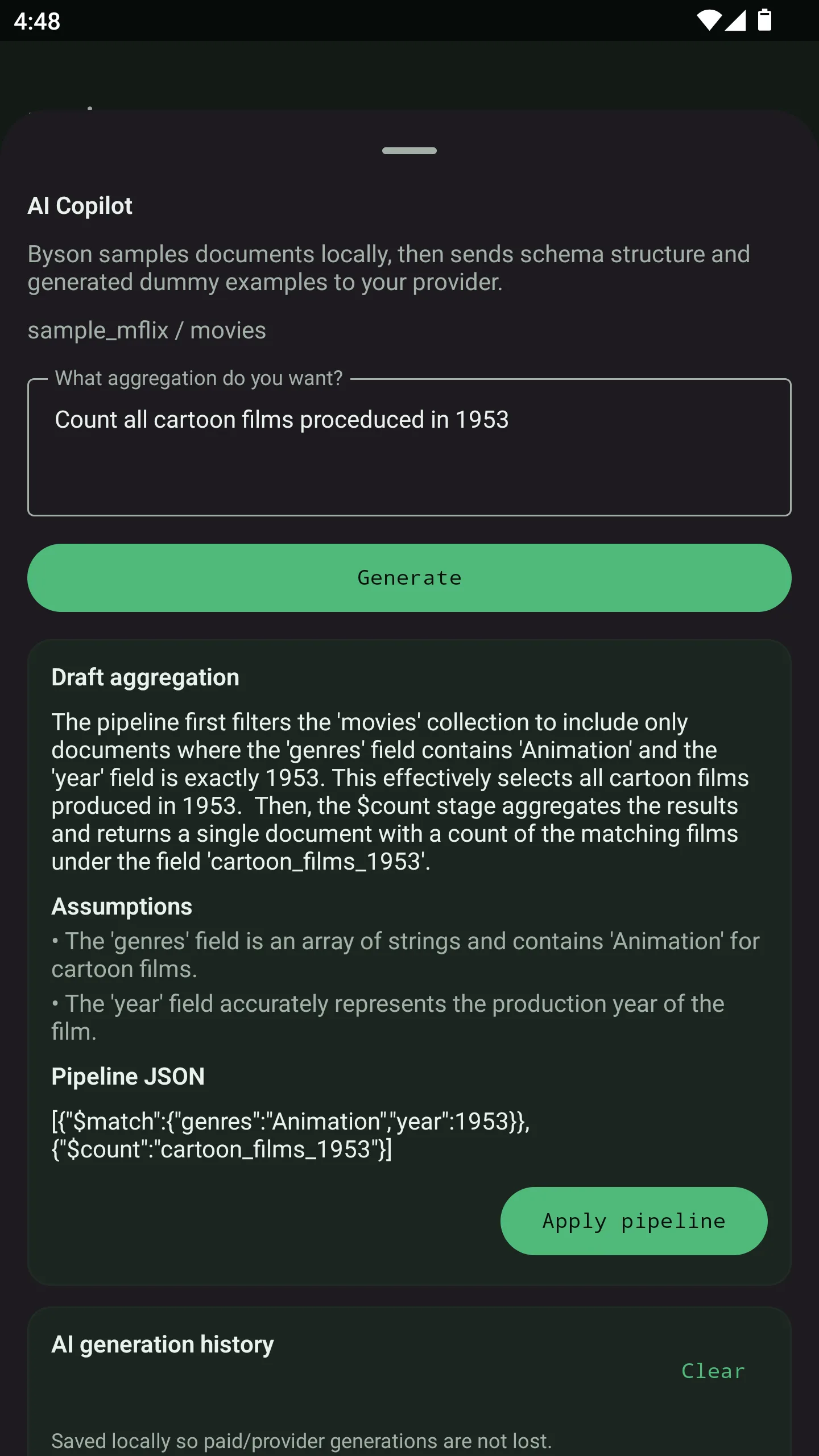
Pricing: Free forever for everyday browsing (3 connections, find queries, basic Schema Analyzer, 10 AI generations/day). Pro unlocks unlimited connections, unlimited AI generations, the full Schema Analyzer, and advanced profiler/export tools - $4.99/month, $39.99/year, or a one-time $79.99 Lifetime.
Best for: anyone who needs to SSH into a remote or production MongoDB and check, query, or fix data away from their desk.
2. MongoDB Compass - the official desktop GUI
Compass is MongoDB's free official desktop client. It's a solid choice for schema exploration and aggregation building on a desktop, with a visual aggregation pipeline builder. But there is no mobile app - if you're on a phone, it's not an option.
Best for: desktop schema exploration and the official toolchain.
3. Studio 3T - desktop power-user toolkit
Studio 3T is a feature-heavy desktop IDE for MongoDB: a SQL-to-MongoDB bridge, import/export, data masking, and more. It's powerful and priced accordingly, with a trial. Again, it's desktop only - no phone client.
Best for: desktop power users who want a SQL bridge.
4. NoSQLBooster - desktop scripting
NoSQLBooster is a desktop MongoDB GUI known for its shell/scripting environment and IntelliSense. Great for developers who live in the Mongo shell - but it's a desktop application, so it won't help you on mobile.
Best for: desktop scripting and shell-heavy workflows.
5. Mingo - fast desktop browsing
Mingo is a newer cross-platform desktop MongoDB GUI (Mac, Windows, Linux) that markets itself on speed and a clean UI, with a BYO-AI assistant similar in spirit to Byson's. It's a nice desktop tool - but, like the others, there's no mobile version.
Best for: fast browsing on a desktop.
So, what is the best MongoDB GUI in 2026?
If you specifically need secure remote MongoDB access on your phone, Byson is the clear pick in 2026 - it's the only one of these built as a real mobile app, and the only one with a built-in SSH tunnel so you can reach production when you're away from your laptop. The optional BYO AI Copilot is a bonus on top. For heavy desktop work, Compass and Studio 3T remain excellent; they just live on a different screen.
Official reference: MongoDB Compass documentation.
Try Byson - free on Android and iOS
Byson is a mobile MongoDB client with built-in SSH tunneling - free on Google Play and the App Store. The BYO AI Copilot is an optional bonus. No account required. Your data stays in your hands.
FAQ
Can I use MongoDB on my phone?
Yes. Byson is a mobile MongoDB client with built-in SSH tunneling, so you can securely reach MongoDB Atlas or a self-hosted server - including production behind a bastion host - and browse, query, and edit data directly from Android or iOS.
Is it safe to connect to a production database from a phone?
Byson encrypts your connection details and AI keys on-device, supports SSH tunnels and TLS, and never auto-runs AI-generated pipelines. As always, use read-only credentials when you can.
Do I need my own AI key?
For the AI features, yes - Byson is BYO AI by design. You bring your own OpenAI, Claude, or Google AI Studio key, you pay your provider directly, and Byson doesn't mark up tokens.
Is Byson free?
There's a free tier for everyday browsing and querying, plus a Pro upgrade for unlimited use and advanced tools - $4.99/month, $39.99/year, or a one-time $79.99 Lifetime.
Related: a MongoDB Compass alternative for mobile →
Related: the best free MongoDB client in 2026 →