
The Best AI for MongoDB in 2026
Picking the best AI for MongoDB is not just about the model. It is about how the tool builds the prompt, what data it sends, and whether it ever runs the result without asking.
Short answer: the best AI for MongoDB is one that uses a strong general model (Claude, a GPT-4-class model, or Gemini) and sends only a schema summary instead of raw documents, validates the output before you can run it, and never auto-runs anything. Capability, privacy, and safety together - not one of the three on its own.
Disclosure: we make Byson, a mobile MongoDB client with built-in SSH tunneling and an optional bring-your-own-key AI Copilot. The principles below apply to any AI-assisted MongoDB workflow, but the examples describe how Byson does it.
What "best AI for MongoDB" actually means
It is tempting to answer "the best AI for MongoDB" with a single model name. But the model is only part of the story. Two tools can call the exact same model and give you very different results, because what really decides quality is how the tool wraps the model:
- What goes into the prompt. A schema summary gives the model the field names and types it needs. Raw documents leak your data and add noise.
- Whether the output is validated. A generated pipeline that is never checked can drop, delete, or rewrite data.
- Whether it auto-runs. A tool that executes AI output immediately removes your chance to review it.
So privacy and safety matter as much as raw model quality. The best setup pairs a capable model with a tool that builds a careful prompt and guards the output. A weaker setup is a strong model wired to send everything and run whatever comes back.
What AI is good at with MongoDB
Modern general models are genuinely useful for MongoDB work. They are good at:
- Generating aggregation pipelines from natural language - "average rating per genre for the last year" becomes a real
$match/$grouppipeline. - Drafting individual stages like
$match,$group,$lookup, and$projectwhen you know the shape but not the exact syntax. - Explaining slow queries in plain language and pointing at the likely bottleneck.
- Suggesting indexes based on the fields a query filters and sorts on.
The limits are just as important. A model only knows the fields you tell it about, and it can hallucinate field names or operators that do not exist in your data or in MongoDB. That is not a reason to avoid AI - it is the reason validation exists. The output should be treated as a draft to review, never as a finished command to trust blindly.
Why the prompt matters more than the model
Here is a concrete example of why model choice alone does not decide the answer. Say you ask for "each movie title with the name of its director" across a movies and a people collection. A weaker model might invent a field that is not in your schema - referencing directorId when the documents actually store director_ref - or reach for the wrong operator, writing a $lookup whose foreignField does not exist on the joined collection. The pipeline then either errors outright or runs clean and quietly returns nothing, which is the more dangerous outcome because it looks like a valid empty result.
A stronger model gets the stages and field names right more often, especially on a deep or nested schema. But "more often" is not "always," and that is the point: neither model should be trusted blindly. This is where the prompt and the guardrails earn their keep. A schema summary tells the model the exact field names so it has no reason to guess. A pipeline safety validator rejects malformed or destructive output, and a human review step lets you read the stages and catch a wrong join before anything touches the database. With both in place, a hallucinated field name becomes a draft you discard in two seconds instead of a query that silently returns the wrong data.
So which provider is "best"? Honestly, it depends on the job. Stronger models (Claude, GPT-4-class, Gemini at the top end) reason better over complex, deeply nested schemas and multi-stage joins. Cheaper, smaller models are faster and perfectly adequate for a simple find or a single-stage aggregate. Because you bring your own key, you pick the trade-off yourself - and switch when the task changes.
The privacy problem (and how to avoid it)
The biggest risk in AI-assisted MongoDB work is data leakage. If a tool sends your real documents to a third-party AI to "understand" the collection, it can ship PII, secrets, tokens, and internal identifiers out of your control. For a regulated or production database, that is a serious problem.
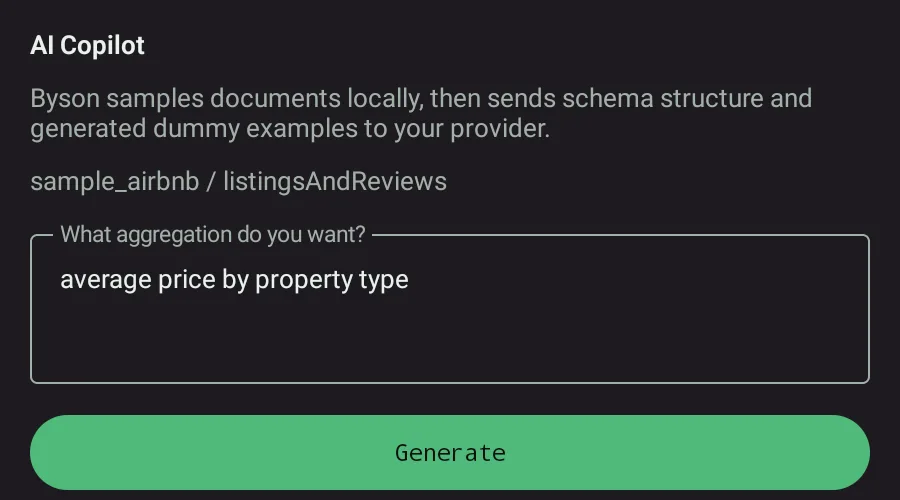
The safe pattern avoids it entirely: send a schema summary (field names, types, and which fields appear) plus synthetic or dummy examples only. The model gets enough structure to write a correct pipeline, and none of your real data ever leaves the device. We go deeper on this in is it safe to use AI with MongoDB data.
How Byson's BYO AI Copilot works
Byson uses a bring-your-own-key model: you connect your own provider account, and there is no token markup because you pay your provider directly. Supported provider families are Anthropic (Claude, native API), OpenAI-compatible chat completions, and Google AI Studio. The workflow is built around the three principles above:
- Schema only, never raw documents. The prompt is built from a schema summary plus generated dummy examples. Real documents and credentials are never sent.
- Strict parsing. The response is parsed as strict JSON, so a malformed answer fails cleanly instead of producing a half-broken pipeline.
- Pipeline safety validator. Generated pipelines are checked before they can be applied. Destructive or unsafe stages such as
$out,$merge, and$whereare blocked. - Draft, no auto-run. The validated pipeline is held as a draft. You review it, edit it, and press Run yourself. Nothing executes on its own.
The free tier includes 10 AI generations per day; Pro is unlimited. Because you bring your own key, the cost of the model calls is whatever your provider charges - Byson does not mark it up.
| Provider | Family in Byson | Bring your own key |
|---|---|---|
| Anthropic Claude | Anthropic native API | Yes |
| OpenAI | OpenAI-compatible chat completions | Yes |
| Google Gemini | Google AI Studio | Yes |
All three follow the same schema-only, validated, no-auto-run path. The "best" choice among them is mostly down to which provider account you already have and which model you prefer - the safety guarantees are the same.
Try schema-aware AI for MongoDB with Byson
Byson is a mobile MongoDB client with built-in SSH tunneling - free on Google Play and the App Store. The BYO AI Copilot is an optional bonus: schema-only prompts, validated pipelines, and no auto-run.
FAQ
What is the best AI for MongoDB queries?
The best AI for MongoDB is a strong general model (Claude, a GPT-4-class model, or Gemini) used inside a tool that sends only a schema summary instead of raw documents, validates the generated pipeline, and never auto-runs it. The model matters, but how the tool builds the prompt and guards the output matters just as much. Byson lets you bring your own key for Anthropic, OpenAI-compatible, or Google AI Studio providers.
Is it safe to use AI with MongoDB data?
It is safe if the tool never sends your real documents to the AI. The safe pattern is to send a schema summary plus synthetic dummy examples only, so no real PII, secrets, or credentials leave your device. Byson follows this pattern: it builds prompts from a schema summary and generated dummy examples, never raw documents, and the generated pipeline is held as a draft that you review before running.
Can AI write MongoDB aggregation pipelines?
Yes. AI is good at turning natural language into aggregation pipelines, drafting $match, $group, and $lookup stages, explaining slow queries, and suggesting indexes. It can also hallucinate field names or operators, which is why the output must be validated and reviewed before it runs. Byson parses the response strictly, runs a pipeline safety validator, and never auto-runs the result.
Related: Turn natural language into a MongoDB query →
Related: Is it safe to use AI with MongoDB data? →