
Natural Language to MongoDB Query With Byson's AI Copilot
Describe what you want in natural language (any language) and get a MongoDB aggregation pipeline back - schema-aware, validated, and held as a draft until you press Run.
Short answer: turning natural language to MongoDB query is exactly what Byson's AI Copilot does - you type a request in natural language (any language) like "average order value per month for 2025" and it returns a ready-to-review aggregation pipeline. Byson samples your schema locally, never sends raw documents, validates the result, and never auto-runs it. Byson itself is a mobile MongoDB client with built-in SSH tunneling - the natural-language Copilot is an optional bonus. It works on Android and iOS.
Disclosure: we make Byson. This explains how its natural-language query feature works; the privacy and safety principles apply to any AI query tool.
Can I write a MongoDB query in natural language?
Yes. Instead of hand-writing a multi-stage $group / $match / $sort pipeline, you describe the result you want. Text to MongoDB aggregation means you say what you need and the Copilot drafts the how:
- Ask in your words. "Top 10 customers by revenue this quarter", "count signups per week", or "average order value per month for 2025".
- Get a real pipeline back. The Copilot returns a MongoDB aggregation pipeline, a short explanation, and a list of assumptions it made.
- Set context hints. You can supply a timezone, a preferred date field, and an output language - which helps relative dates like "last month" resolve correctly.
That is the whole point of asking AI for a MongoDB query: you stay in intent, not syntax, and the tool handles the operator plumbing.
How does natural language become a pipeline?
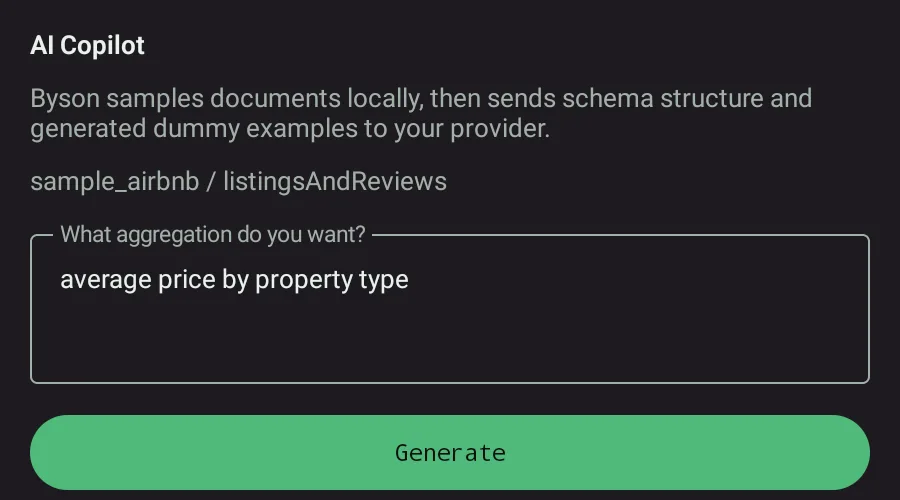
When you open the AI Copilot on a collection and type a request, here is the flow that produces a MongoDB query from natural language:
- Local schema sampling. Byson samples the collection schema on-device to learn field names and types.
- Safe prompt. It builds a prompt with that schema summary plus redacted or synthetic example values - never your raw documents.
- Generation. Your AI provider returns a pipeline, an explanation, and a list of assumptions.
- Strict parse + validation. Byson parses the response as strict JSON and validates it for unsafe stages before it can be applied.
- Review, then run. The draft loads into the aggregation editor in AGGREGATE mode and does not auto-run. You review, edit, and press Run yourself.
Does the generated query run automatically?
No - and that is deliberate. When you ask AI for a MongoDB query, the riskiest moment is a model silently executing something destructive or expensive. Byson removes that risk:
- The pipeline is parsed as strict JSON, so a malformed response is rejected rather than half-applied.
- It is validated for unsafe stages before it can load.
- The draft lands in the editor in AGGREGATE mode and waits. Nothing touches your database until you press Run.
How does Byson keep my data private?
The model never sees your records. Byson sends a schema summary with redacted or synthetic example values - enough structure to write a correct pipeline, none of your real data. You bring your own key (Anthropic Claude, an OpenAI-compatible endpoint, or Google AI Studio), and it is encrypted on-device and never logged. The free tier includes 10 generations per day.
The takeaway
Converting natural language into a MongoDB query collapses the gap between "what I want to know" and "the aggregation that answers it". You describe the result, the Copilot drafts a schema-aware pipeline, and you keep the final say - review, edit, and run on your own terms.
Official reference: MongoDB - Aggregation Pipeline.
Try the AI Copilot in Byson
Byson is a mobile MongoDB client with built-in SSH tunneling - free on Google Play and the App Store. The BYO AI Copilot is an optional bonus. Bring your Anthropic, OpenAI-compatible, or Google AI Studio key.
FAQ
Can I write a MongoDB query in natural language?
Yes. With Byson's AI Copilot you type a request in natural language (any language) - like "average order value per month for 2025" - and it returns a MongoDB aggregation pipeline plus an explanation and a list of assumptions. You can add context hints (timezone, a preferred date field, output language) so relative dates like "last month" resolve correctly and results are explained in your chosen language.
Does the generated query run automatically?
No. The generated pipeline is parsed as strict JSON and validated for unsafe stages, then loaded into the aggregation editor in AGGREGATE mode. It never auto-runs - you review it, edit if needed, and press Run yourself.
How does Byson keep my data private when using AI?
Byson samples your collection schema locally and sends only a schema summary with redacted or synthetic example values to your AI provider - never your raw documents. You bring your own key (Anthropic Claude, OpenAI-compatible, or Google AI Studio), and it is encrypted on-device and never logged.