
MongoDB Aggregation Safety: How Byson Blocks $out and $merge
A bad aggregation stage can overwrite a collection or run arbitrary code on your server. Here is how a pipeline safety validator stops that before anything runs.
Short answer: MongoDB aggregation safety means validating a pipeline before it can run so destructive or code-execution stages never reach your database. Byson runs a pipeline safety validator on both AI-generated and manually typed aggregations, blocking $out, $merge, $where, $function, and $accumulator, warning on expensive stages, and capping previews. It works the same on Android and iOS.
Disclosure: we make Byson. This explains how its aggregation-safety layer works; the underlying risks apply to any tool that runs MongoDB aggregations.
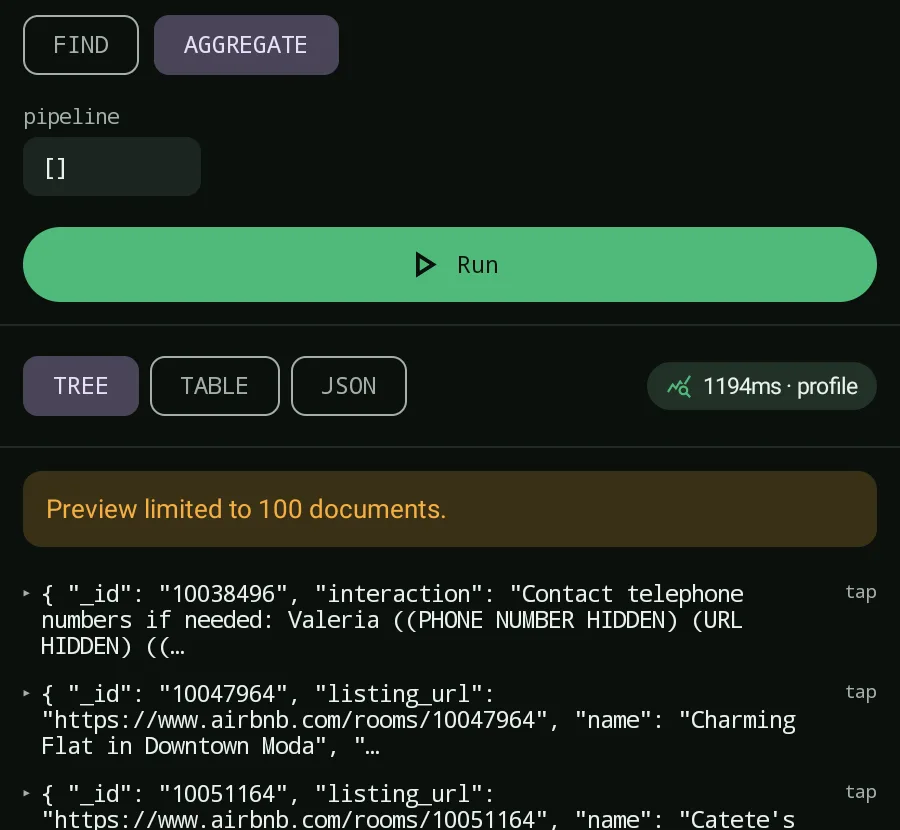
What can a "read-only" aggregation actually do?
Most people think of the aggregation framework as a query language - you put documents in, you get a result out. That is true until a pipeline reaches a stage that writes. Two stages can change your data:
$outwrites the aggregation result to a collection, replacing its entire contents.$mergewrites the result into a collection too, inserting, updating, or overwriting documents.
Three more stages run arbitrary server-side code: $where, $function, and $accumulator. On a phone, where it is easy to fat-finger a pipeline or paste one you do not fully understand, that is a real risk. A safe aggregation pipeline should never be able to write or execute code by accident.
How the pipeline safety validator works
Byson runs the same validator on every pipeline - whether you typed it by hand or the AI Copilot generated it - before you can apply or run it. The validator does three things:
- Blocks destructive stages. If a pipeline contains
$outor$merge(write/overwrite) or$where,$function, or$accumulator(server-side code), it is blocked and cannot run. - Warns on expensive stages. Stages that can be slow or memory-heavy -
$lookup,$facet, and$unwind- raise a warning, as does a pipeline with no$limit. - Caps the preview. Results are clamped for mobile so a heavy pipeline cannot pull a giant result set onto your device.
Crucially, nothing auto-runs. A validated pipeline loads into the aggregation editor as a draft - you review it and press Run yourself.
Which stages are allowed, blocked, or warned
| Status | Stages | Why |
|---|---|---|
| Allowed (runs as-is) | $match, $group, $project, $sort, $limit, $skip, $addFields, $count | Read-only shaping and analysis stages |
| Allowed, with a warning | $lookup, $facet, $unwind (or a pipeline with no $limit) | Run, but flagged as potentially slow or memory-heavy - review first |
| Blocked | $out, $merge (write/overwrite collections); $where, $function, $accumulator (server-side code) | Cannot run - they can modify data or execute arbitrary code |
Why mobile previews are capped
Even a perfectly safe pipeline can return more data than a phone should pull over a mobile connection. To keep aggregations from exhausting memory or your data plan, Byson caps every preview:
- 100 documents maximum per preview.
- 500KB total result size.
- 20KB per individual document.
These limits apply to the preview you see in the app, so you can verify the shape and correctness of your output without the risk of dragging a million-document result onto your device.
The same rules for AI and manual pipelines
It would be tempting to validate only AI-generated pipelines, since those come from a model. Byson does not draw that line. Whether the AI Copilot wrote the pipeline or you typed it into the aggregation editor, it passes through the identical safety validator before it can run. That means there is no "trusted" path that skips the checks - $out and $merge are blocked everywhere, and the warnings fire for everyone.
The takeaway
Aggregation safety is not about trusting yourself or the AI to never make a mistake - it is about making the dangerous mistakes impossible. By blocking writes and code execution, warning on costly stages, capping previews, and never auto-running, Byson lets you explore your data on mobile without the fear that one stray stage overwrites a collection.
Official reference: MongoDB - $out stage.
Run aggregations safely in Byson
Byson is a mobile MongoDB client with built-in SSH tunneling - free on Google Play and the App Store. The BYO AI Copilot is an optional bonus. Every pipeline is validated before it runs.
FAQ
Why does Byson block $out and $merge in aggregations?
Because $out and $merge write to or overwrite collections - they can silently replace your data with an aggregation result. Byson's pipeline safety validator blocks both stages outright so an aggregation can only read, never write. It also blocks $where, $function, and $accumulator, which run arbitrary server-side code.
Is it safe to run AI-generated aggregations?
In Byson, yes. Every AI-generated pipeline goes through the same safety validator as a manually typed one before you can apply it, so destructive and code-execution stages are blocked. Nothing auto-runs - the draft loads into the editor, you review it, and you press Run yourself.
What are the aggregation preview limits on mobile?
Byson caps aggregation previews at 100 documents, 500KB total, and 20KB per document. These limits prevent a pipeline from pulling a huge result set over mobile data or running your device out of memory, while still showing enough to verify the output.
Related: MongoDB SSH mobile client →
Related: MongoDB AI aggregation generator (optional bonus) →
Related: Generate aggregations with your own AI key →